

How to use Canva to create business documents
Canva has traditionally been used to create social media posts, social profiles, logos, business cards, but Canva can also help you create beautiful Branded documents for your business that will give you credibility and build trust.
My website and business proposals need a re-design as they were made in Word, so I am going to show you how to make beautiful business documents in Canva.
If you are not yet using Canva, then I recommend signing up for a free account today and just have a play with it. It is super light and easy to use and with the help of the Canva Gurus on YouTube you will be up and running in no time.
If you don’t have the time or inclination to learn, reach out and I will help you with the designs.
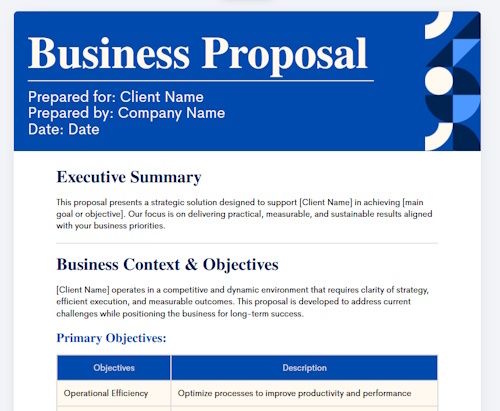
Here are a few of my favourite documents I make in Canva today.
Create your Brand Kit for your documents
The first thing to do is to create a Brand Kit for your projects so all the documents are consistent and professional.
The Brand Kit lets you set colours, fonts, and ensures all your work will look and feel consistent.
Free Document Creator
Canva Docs is a free online document maker that will help you craft any document in your branded style. That is amazing.
You can even collaborate by creating a team to work together on projects so you can share your documents with others in your team, or rather than emailing the document you can share it directly from Canva.
Use the prebuilt templates
Don’t make life hard when so many great designers are doing the initial work for us. All we need to do is pick a design that works and then adapt it to fit our brand and purpose.
Select Create, pick what you want to work on then select template, then you can search for a topic such as food, weddings etc.
Use Magic Write
Magic Write is an AI tool to help you draft text content for your document. It can also create graphics and images.
Customize the design
Your documents need to reflect your brand so customers associate your documents with our business at first glance. Its about gaining that trust that you are selling the vision and being authentic.
People need to know you are the real deal.
You do not need to be a designer to create professional documents.
Design tips and recommendations
Keep it simple, not too many colours, fonts or clutter, just simple fonts people can read and is easy on the eye.
Good use of headings, good use of space and make sure everything aligns propertly. Left alignment looks better than centered alignment in most cases.
- Headings – big to small
- Text font size – not too big or small
- Good use of images and graphics, but keep them small
- Ensure contact details are on the document
- page numbers (if more than one page)
- Highlight important points
- Good use of bullet points
What documents can I make in Canva?
Here are a selection of documents you can make in Canva:
- Contracts
- Business and work Proposals
- Onboarding instructions
- Client Welcome letters
- Feedback Forms
- Project Update Reports
- Invoice Templates
- Data reports
- Sales documents
- Resume
The above is a selection of potential uses for Canva documents but it is not a full list as the document tool could be used for any kind of document.
Conclusion
You can even create website designs to hand to your web developer.
Canva can really help you gain trust and credibility with clients and prospects when your documents align with your website and business proposition.
With Canva you already have documents created by professional designs to use and adapt to your business branding just be adding your logo and change the colour and fonts in most cases it will be that simple.